
Description
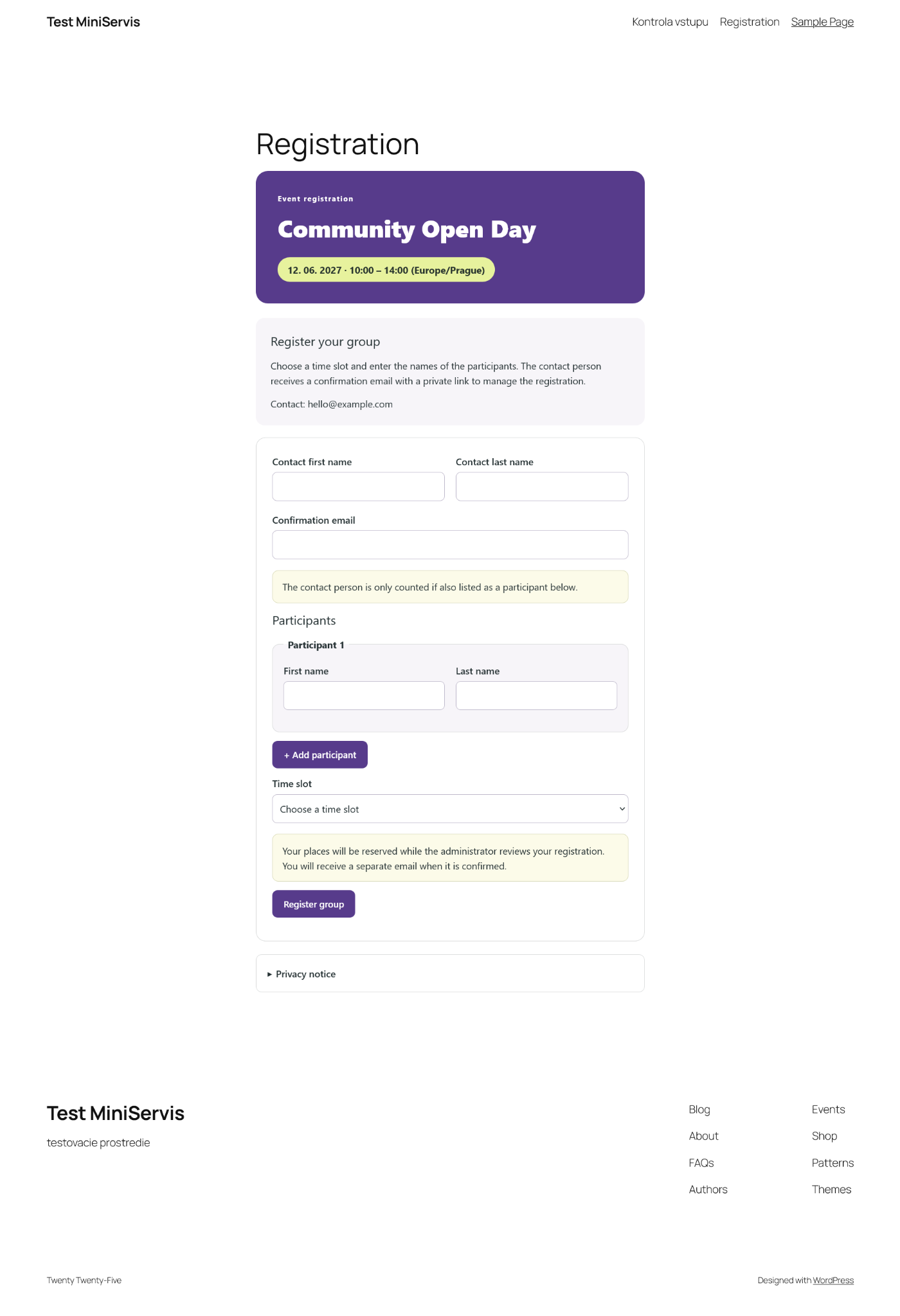
GroupEntry helps organizers manage group registrations for a whole event or for scheduled arrival times. One contact person enters participant names and receives an email with a private link to manage the registration. Time-slot events also ask the contact person to choose an arrival time. Staff check in the whole group from a mobile-friendly page.
Use it for workshops, community events, group visits and other activities where participant capacity and arrival times matter.
Registration and capacity
- Choose registration for the whole event or for individual time slots.
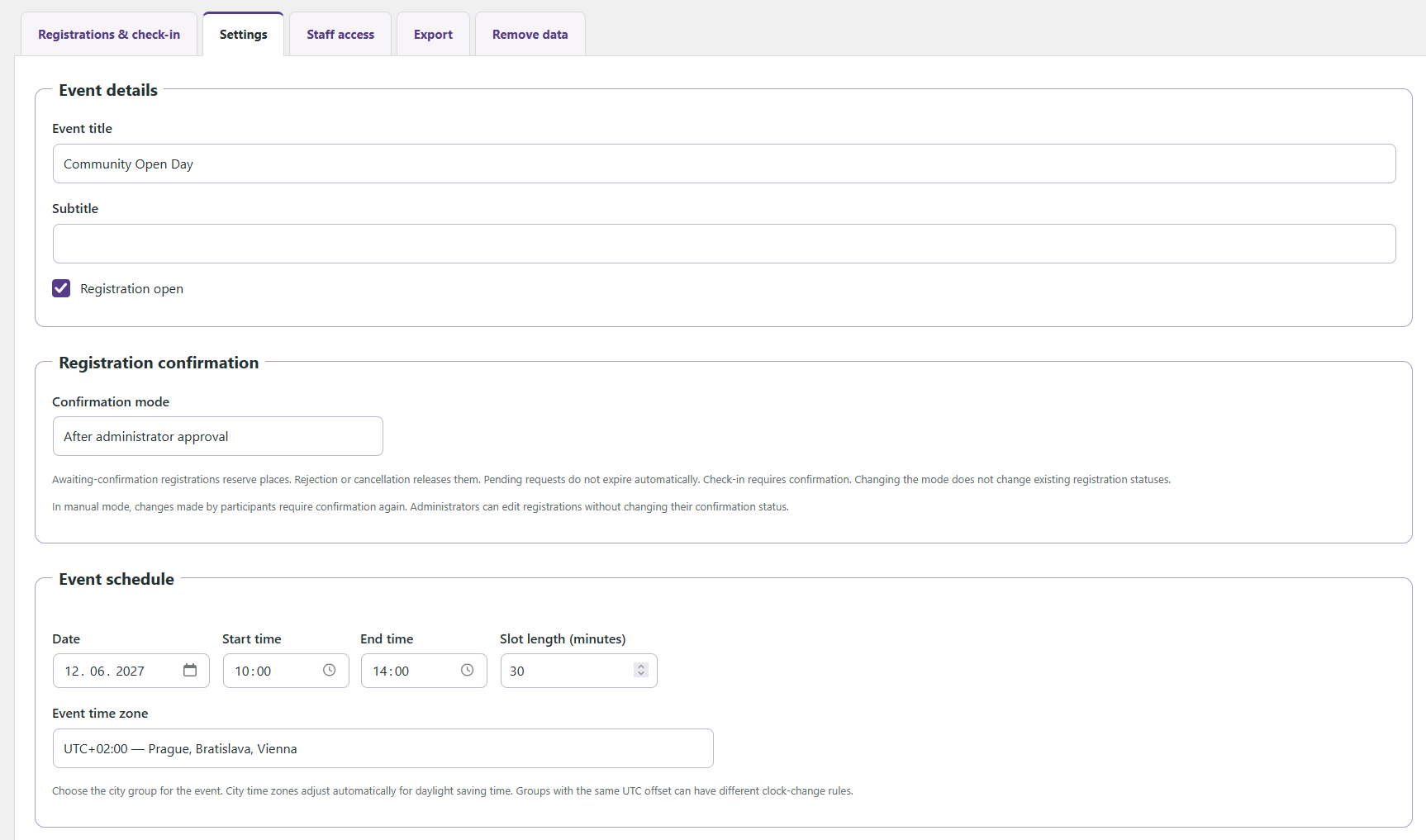
- Configure one event with its date, start and end times and time zone. Time-slot events also have a slot duration.
- Set total participant capacity for the whole event, or capacity per time slot, and the maximum number of participants per registration.
- Collect participant ages and set age limits when needed; age collection is off by default.
- Let participants edit or cancel through their private email link before the original reserved slot starts and before check-in.
- Choose immediate confirmation or administrator approval. Pending registrations reserve places; rejection or cancellation releases them.
The contact person occupies a place only if also listed as a participant. The event starts and finishes on the same calendar date. Whole-event registration uses one shared capacity without a time selector or slot-length limit. Time-slot registration supports up to 100 complete slots, each 5–240 minutes long. Registration and participant changes close when the event starts in whole-event mode, or when the reserved slot starts in time-slot mode. Registration mode and event schedule cannot change while registration records exist. Registration groups can contain 1–100 participants, subject to the organizer’s chosen maximum.
Check-in and administration
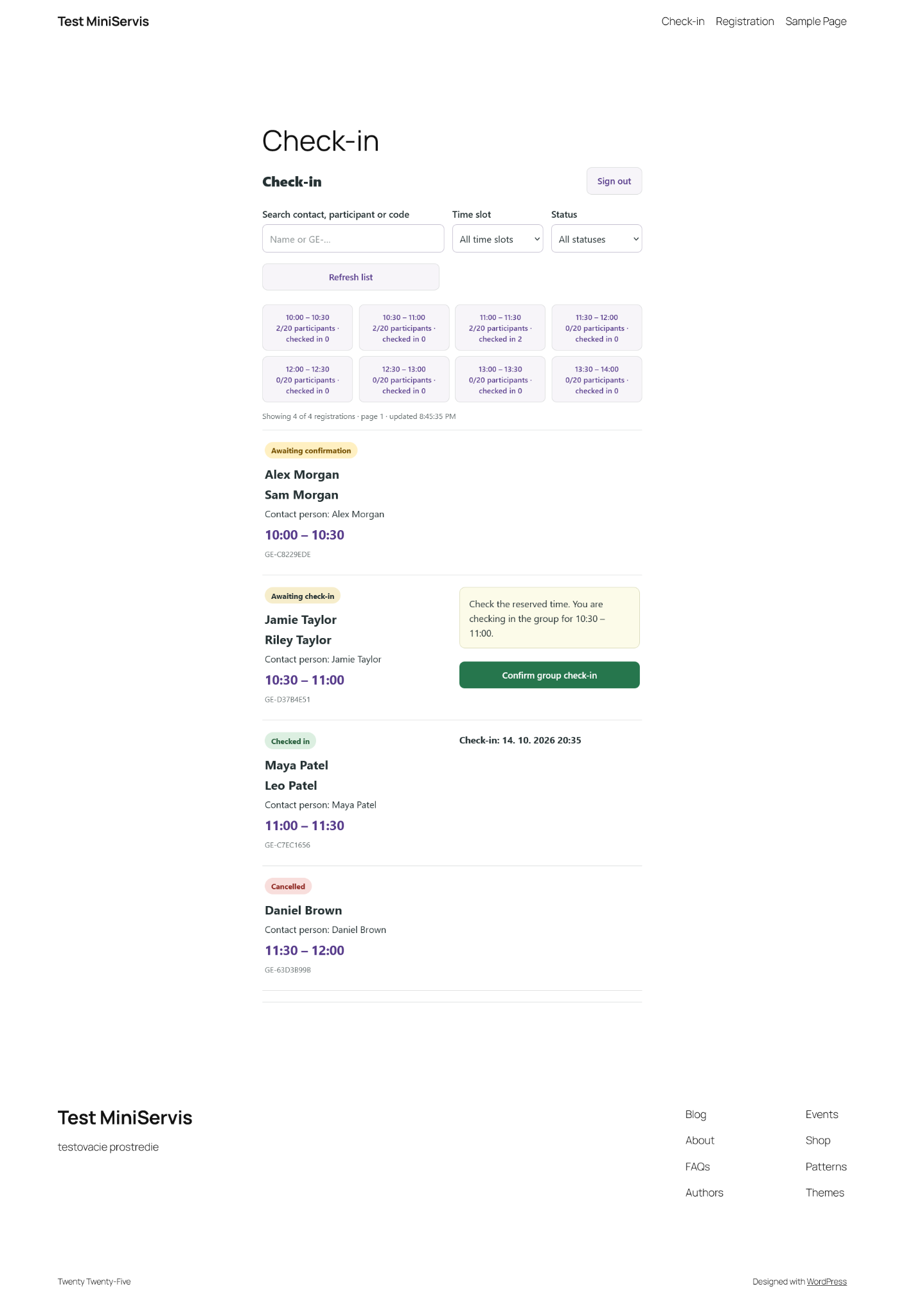
- Give staff access through a shared code or a WordPress account with the GroupEntry check-in staff role.
- Check in the whole registration and undo a check-in when needed.
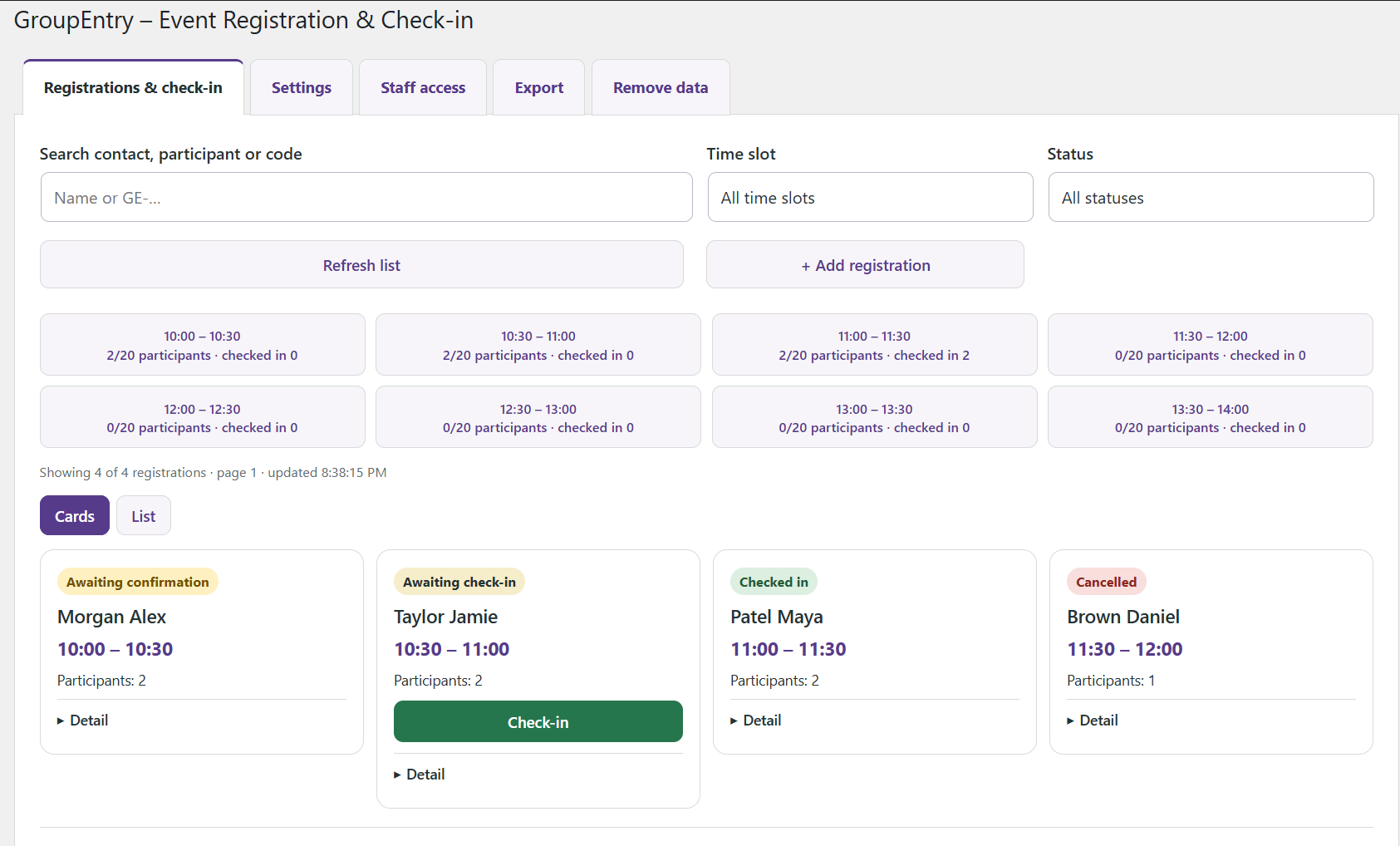
- Use compact registration cards or an expandable list with filters and search.
- Manage registrations, approve or reject pending requests and resend registration emails.
- Export registrations and participant details to CSV.
- Customize page colors, introduction text and email instructions. Both email types have live previews.
Check-in staff can see participant names, optional ages, reserved times and attendance. Settings, approval/rejection and exports are administrator functions; check-in staff cannot see contact email addresses.
Languages
GroupEntry is translation-ready. Available translations are downloaded and updated separately by WordPress through translate.wordpress.org; language catalogs are not included in the plugin ZIP. Availability depends on translations being submitted and approved for the selected language.
The public form and system email text follow the WordPress site language; the administration interface follows the user’s WordPress language. Original default introduction and confirmation-email text display in the current language when a language pack is available. Exact translated defaults saved by earlier builds can be recognized from installed language packs. Organizer-edited texts stay as entered. CSV headings are translated, while stored status identifiers remain unchanged.
Contribute translations through the plugin’s project on translate.wordpress.org after publication. GroupEntry currently uses one set of organizer texts per event and has no visitor language switcher.
Privacy and data retention
Choose how many days to keep registration data after the event ends. Daily scheduled cleanup removes registrations, participants and check-in activity after that period and closes registration. Its actual run depends on site traffic or hosting cron.
The registration-page privacy notice automatically includes a sentence with the saved retention period and an explanation of scheduled cleanup and separate copies. Organizers write their own privacy information without entering a retention period or template variable. The settings preview responds immediately to edits; public text uses the saved settings. Existing organizer text is preserved: review it once and remove any old retention sentence. Previously saved {retention_days} markers remain supported for compatibility. Separately published policies, emails and other copies require manual review.
GroupEntry integrates with WordPress personal-data export and erasure tools and supplies suggested privacy-policy text for the organizer to review. Requests use the contact email and apply to entire group registrations. Individual participant requests require organizer review because participant email addresses are not stored.
Registration data stays in the site’s database. The plugin adds no analytics, payment processor or external booking service. Email delivery uses the site’s normal WordPress mail configuration. Emails, downloaded exports and backups are separate copies with their own retention policies.
Screenshots
Installation
- Upload groupentry-1.0.6.zip through Plugins > Add New > Upload Plugin and activate.
- Open GroupEntry. When no valid registration page is selected, Settings opens with Page setup first. Follow its four-step Getting started guide.
- Create a published registration page with a Shortcode block containing [groupentry_registration].
- For a separate staff check-in screen, create a published page with a Shortcode block containing [groupentry_checkin]. Reload GroupEntry after publishing pages.
- Open GroupEntry > Settings. Enter the event details, choose the registration page and supply organizer contact details and a privacy notice.
- Choose whole-event or time-slot registration, then set capacity, maximum group size, any age rules, confirmation mode and data retention.
- Open Staff access and set a shared code, or create WordPress users with the GroupEntry check-in staff role.
- Save the settings, enable Registration open for a test, and verify email delivery and a complete registration/check-in flow before sharing the public page.
Requirements: single-site WordPress 6.5+, PHP 8.1+, MySQL/MariaDB with InnoDB, REST API and JavaScript. Staff code access requires HTTPS except for local testing. Exclude the registration and check-in pages and GroupEntry REST routes (/groupentry/v1/) from page/CDN caching.
Registration is closed after a new installation. Defaults are an event one week ahead, 13:00–17:00, 30-minute slots, 30 participants per slot, up to 10 participants per registration and a 30-day retention period. Organizer contact and privacy information must be completed before registration opens.
FAQ
-
Can I require payment before confirming a registration?
-
Yes, using administrator approval. Enter your payment instructions in the awaiting-confirmation email. The organizer checks payment outside GroupEntry and then confirms or rejects the registration. GroupEntry does not process or verify payments. Pending requests reserve capacity and do not expire automatically; review unpaid requests to release their places.
Changing confirmation mode does not change existing statuses. In manual mode, participant edits return a confirmed registration to pending; administrator edits preserve its current status. Approval and rejection are available only for pending registrations, and check-in requires a confirmed registration.
-
Can participants manage their own registration?
-
The contact person receives a private email link to view, edit or cancel the group registration. Changes are available before the original reserved time starts and before check-in. Do not share this link. Approval and resending an email generate a replacement management link; the previous link stops working even if sending the new email fails.
-
Does the contact person count toward capacity?
-
Only when entered in the participant list. Capacity counts named participants, and check-in applies to the entire group rather than individual participants.
-
Can I run several events at once?
-
This version manages one event at a time. To reuse it, close registration and remove the previous event’s registrations before configuring the next event. Date, hours, time zone and participant rules remain locked while any registrations exist, including cancelled registrations. Capacity can change if it stays at least equal to existing reservations in every slot.
-
How do time zones and daylight saving time work?
-
The initial event zone follows WordPress and is then saved separately. Choose a named city group for automatic daylight saving adjustments. Cities are grouped only when their known clock changes agree for the event and the following ten years. A saved fixed UTC offset is preserved and labelled; it does not adjust for daylight saving. An event crossing a clock change is rejected; choose different hours.
-
Why has automatic deletion not happened at the exact deadline?
-
The retention period starts at the event’s end time in its saved time zone. Cleanup checks once a day through WP-Cron, which normally runs when the site receives traffic. A check before the deadline can leave data until the next check. Use hosting cron if you need scheduled tasks to run independently of traffic. Cleanup requires an active plugin; deactivation or removal stops its scheduled cleanup. Reactivation resumes it and can remove overdue data.
Cleanup preserves event settings and time slot definitions. Emails, CSV/ZIP downloads and hosting backups are separate copies. Manual removal is available in Remove data after registration closes and requires typing DELETE.
-
What if registration email delivery fails?
-
The booking or administrator decision remains saved. Check the email status, verify your WordPress mail setup and use Resend email after fixing delivery. An accepted sending status does not prove inbox delivery. If a submission times out, retry the same form before refreshing so it keeps its request identifier.
-
How does staff access work?
-
Staff can use the [groupentry_checkin] page with a WordPress staff account or a shared access code. Shared codes do not identify individual operators in activity records; use individual accounts when attribution matters. Code sessions last up to 12 hours. Changing or disabling the code signs out existing code sessions.
Administrators can see the saved staff code on the Staff access tab. A legacy hash-only code needs to be re-entered once to enable its display. Changing WordPress authentication keys can make the encrypted display unreadable; re-entering the code restores it.
-
How do WordPress privacy requests work?
-
Use Tools > Export Personal Data or Tools > Erase Personal Data. GroupEntry also links to these tools from Settings. WordPress handles the request confirmation, capability and nonce checks.
For a contact email, export includes complete group registrations and participant details across all statuses. Erasure removes those entire registrations, participants and related activity/check-in records, releases capacity and invalidates private links without sending a registration email. Review the requester’s entitlement and group scope before processing a request. Individual participants without a stored contact email need organizer identity and group review.
For a matching WordPress staff account, export includes that user’s activity without disclosing other groups’ participant names or emails. Erasure anonymizes staff identity while preserving the groups and attendance. Shared-code activity cannot be matched to an individual worker. Security hashes, private tokens and staff codes are excluded from exports. Failed processing batches are rolled back and reported for retry. WordPress accounts, emails, downloaded exports and backups are separate and are not removed by a GroupEntry privacy request.
-
What happens when I delete the plugin?
-
Data is kept by default, including when older saved settings have no uninstall option. Deactivation and updates preserve data. To remove GroupEntry data permanently, enable the removal option in Settings > Uninstalling GroupEntry, save it, then deactivate and delete the plugin through WordPress.
Opted-in uninstall removes GroupEntry tables, options, database-backed staff sessions and plugin-specific roles/capabilities. WordPress accounts, other roles, pages, posts, other plugins, emails, exports and backups remain. Users with only the GroupEntry role are left without a site role. Staff sessions in an external object cache cannot be enumerated and expire within 12 hours; deleting the access code immediately prevents their use. Remove unused shortcodes from pages yourself.
-
What platforms have been tested?
-
Functional and language tests passed on WordPress 6.5 with PHP 8.1 and 8.3, and WordPress 7.1.3 with PHP 8.1; the ongoing development baseline also used WordPress 7.1.3 with PHP 8.3. Database testing used MariaDB 10.11.14 with InnoDB. The single-site plugin has also been tested on a separate live hosting installation. This does not cover every hosting, theme, browser, database version or caching configuration.
Reviews
There are no reviews for this plugin.
Contributors & Developers
“GroupEntry – Event Registration & Check-in” is open source software. The following people have contributed to this plugin.
Contributors
“GroupEntry – Event Registration & Check-in” has been translated into 1 locale. Thank you to the translators for their contributions.
Translate “GroupEntry – Event Registration & Check-in” into your language.
Interested in development?
Browse the code, check out the SVN repository, or subscribe to the development log by RSS.
Changelog
1.0.6
- Show page setup before event fields and open Settings automatically when a valid registration page has not been selected.
- Add a four-step guide for WordPress pages, shortcodes, event settings and a test registration.
- Add an administrator-only About GroupEntry tab with the installed version, author, license, support and review links.
1.0.5
- Automatically add the retention sentence to the registration-page privacy notice and its live preview.
- Explain cleanup timing and separate copies; remove the need to enter a template variable.
- Remind organizers to review old retention sentences while preserving their existing text.
1.0.4
- Resolve {retention_days} in the registration-page privacy notice using the saved retention period.
- Add a live privacy-notice preview and a reminder to review manually written periods when retention changes.
- Preserve existing organizer text and the actual cleanup schedule.
1.0.3
- Add whole-event registration with one shared capacity and no time selector.
- Adapt default introduction text, confirmation emails, previews and availability messages to the registration type.
- Preserve existing time-slot events and prevent mode changes while registration records exist.
- Explain invalid end times, incomplete slots and the 100-slot limit separately.
1.0.2
- Use WordPress.org language packs and automatic translation loading instead of bundled language files.
- Load JavaScript translations from the standard WordPress language directory.
- Recognize exact default content from installed MO and PHP language packs while preserving organizer-edited texts.
1.0.1
- Add complete Spanish PHP and JavaScript translations for Spain and supported Latin American regional language codes.
- Translate default event text, registration emails, email previews, privacy tools and CSV headings into Spanish.
1.0.0
- First stable release: group registration, time slots, participant capacity, optional ages, private management links and group check-in.
- Include automatic or administrator confirmation, registration emails and previews, CSV export, staff access and configurable colors.
- Include automatic retention cleanup, WordPress personal-data tools and opt-in data removal on uninstall.
- Include English and Slovak interfaces and automatic localization of original default content.